Transforming a legacy enterprise application

Team Members
UX Team (6D, 1R), Product Managers, Tech Leads, Project Managers, Executive & Business Stakeholders
Role
UX Lead
Toolkit
Contextual Research, Information Architecture, UX Strategy, Service Design, Stakeholder Alignment
At a glance
By pairing in-lab research with practical leadership, we modernized an enterprise lab management system and created faster, error-resistant workflows for Glidewell’s lab employees.
Operating on a beating heart
A dental lab is a high-volume manufacturing operation where precision and turnaround time dictate success. Dentists rely on a dental lab to deliver custom restorations on tight clinical schedules because a delayed case means a rescheduled patient. For a dental lab, the lab management system (LMS) is a tool for production and it must prioritize speed, accuracy, and uninterrupted workflow over decorative UI.
In the early 2020s, Glidewell was expanding rapidly, but our growth hit a wall against a monolithic legacy system. Built on decades of technical debt, this legacy infrastructure slowed floor operations, restricted modern tech integration, and left us unable to give dentists real-time visibility into their cases. Replacing it wasn't just a visual refresh—it was a critical necessity for operational scale.
Buying an off-the-shelf solution was not an option for our highly specialized custom manufacturing domain. Furthermore, asking the business to standardize decades of complex, human-driven processes to fit a new system was unrealistic within our timeframe. Our early discussions lead to the decision that the software had to adapt to the reality of the lab, not the other way around.
Transitioning to this modern platform was the technical equivalent of performing surgery on a beating heart. We couldn’t simply “turn off” the old systems; any production downtime or inability to ship cases was a massive liability to our customers and their patients. The UX team’s challenge was to quickly and deeply understand the lab's physical operations, and architect a modern ecosystem that solved critical legacy issues while allowing the business to slowly phase into modernized workflows without disruption.
Constraints
Data Syncing: Maintaining real-time data syncing between the legacy and new modern systems during a multi-year phased transition.
Operational Continuity: Managing a fault-tolerant migration strategy that allowed high-volume departments to transition without halting the manufacturing throughput of thousands of custom cases.
Stakeholder Architecture: Aligning a massive group of POs, PMs, and Tech Leads during requirements-gathering to balance long-term scalability with immediate production needs.
Translating research into product strategy
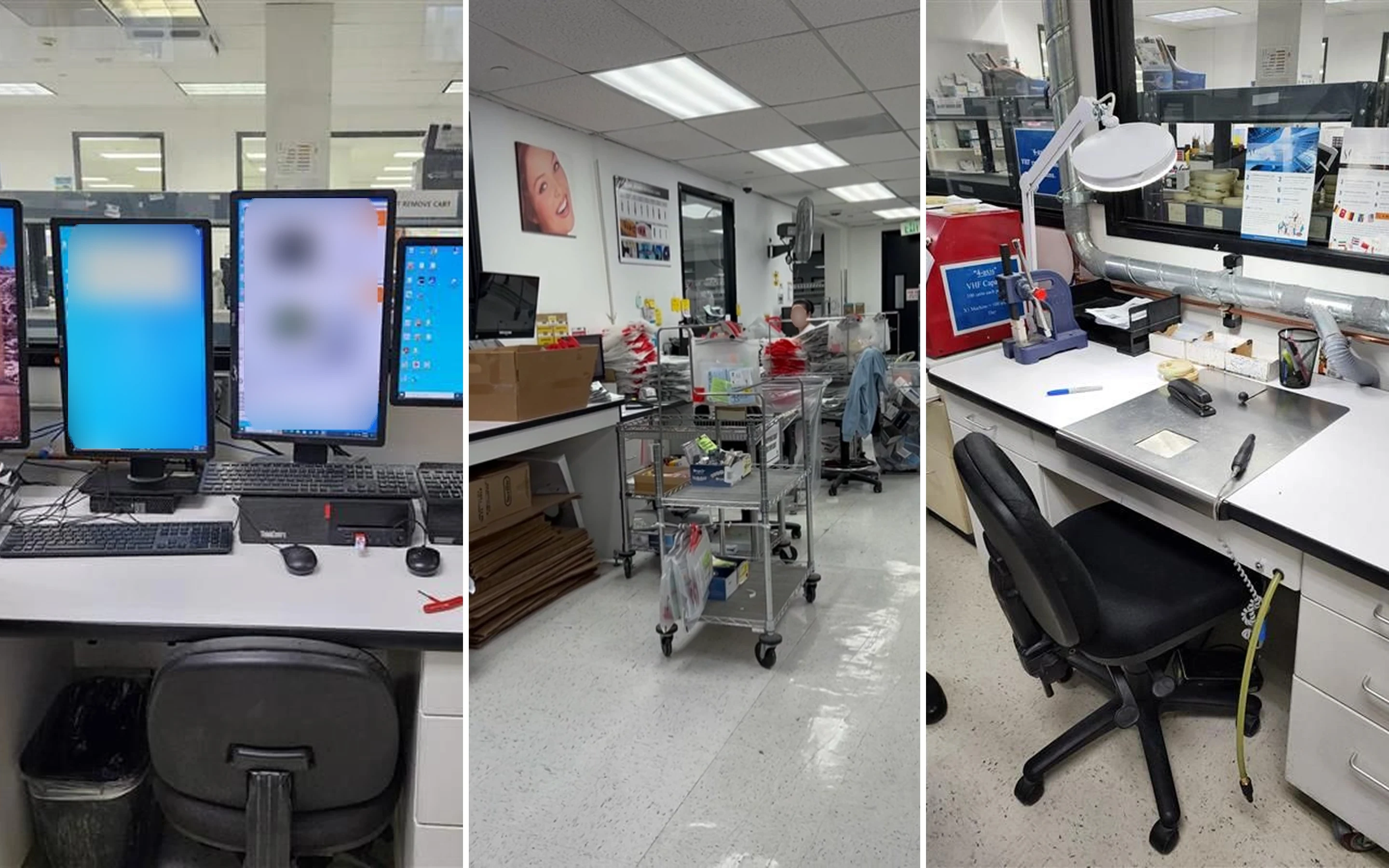
You cannot solve physical manufacturing problems from a desk. The architecture of our new LMS ecosystem was driven by a hands-on, research-led process:
Contextual Research: I had the UX team execute weeks of field research on the lab floor, shadowing technicians and documenting observations in our Dovetail research repository.
Strategic Alignment: We brought these ground-truth insights directly into product requirement discussions to advocate for the user's physical constraints.
Ecosystem Strategy: The research showed a single interface would fail. Instead, I designed a product architecture for a distributed ecosystem of three specialized apps—each tailored to its specific device and environment to keep cases moving seamlessly.
The distributed 3-app ecosystem

Rather than forcing a single, generic platform onto a complex custom dental manufacturing environment, I established the product strategy and architected a distributed 3-app ecosystem. I defined the system architecture and product requirements for each app, then guided my UX team through designing each one to fit the physical realities and operational rhythms of its specific user group.
LMS App | Routing App | Tech App | |
|---|---|---|---|
Users | Data Entry Specialists | Distributors | Lab Technicians |
Location | Seated at desks; processing thousands of cases/day. | Constantly on the move routing cases between lab departments. | Seated at workbenches with debris, liquid, and open flames. |
Device | Desktop (monitor, keyboard, and mouse) | Mobile Phone | Tablet |
Priority | Optimized for hotkeys, rapid intake, and complex data entry over aesthetics. | Zero clutter UI designed for instant barcode scans and transit on the go. | Large-target layouts and tap-friendly from arm's length. |

LMS App
Desktop interface designed for lab staff to rapidly process high volumes of complex dental lab cases.
Custom Rx data entry
End-to-end case management & status tracking
Invoicing, returns processing, and shipping fulfillment
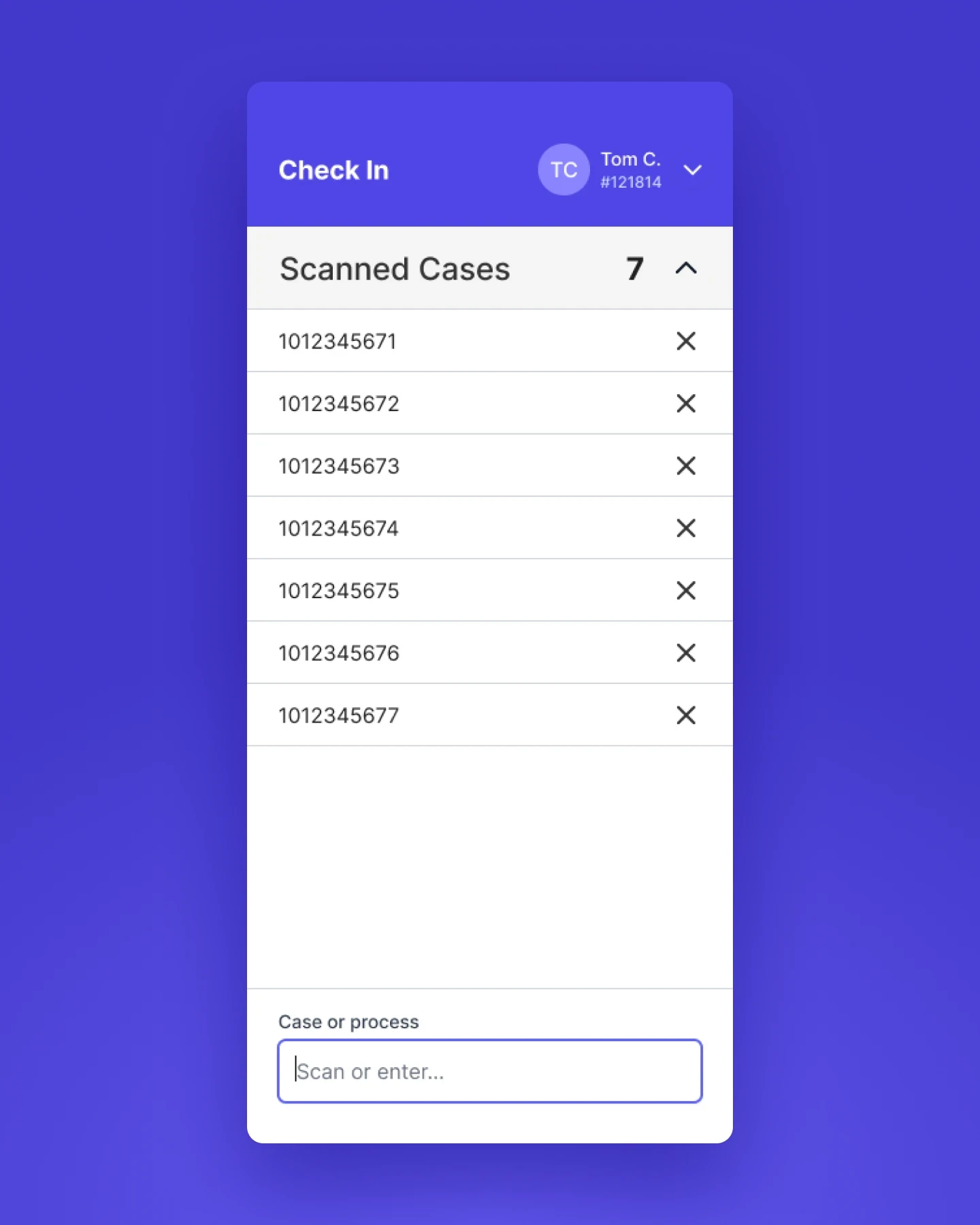
Routing App
Handheld mobile scanner interface built for floor runners to rapidly log real-time location and department handoffs.
Barcode scanning to view and assign locations
Fast department-to-department routing
Immediate handoff verification & location updates

Tech App
Tablet interface designed for lab technicians operating in demanding workbench environments.
Fabrication spec & job instruction viewing
Active task tracking & quality checkpoints
Real-time production status & process updates
Choosing precision over aesthetics

The most complex design challenge in the LMS project was by far Case Entry. Every physical inbound case contained a paper doctor’s prescription (Rx). The Rx was essentially an unstructured, highly custom piece of analog data filled with hand-written requirements, unique doctor preferences, and other logistical notes.
Designing for this meant converting ambiguous, handwritten notes into structured, machine-readable data. Adding to the friction, the legacy system expected users to memorize 10,000+ product codes to support our vast product offering.
Challenge: Design a system that eliminates memory reliance and prevents errors, while keeping the workflow fast enough for advanced users.
Integrated Product Database: Linked a structured database to the entry form so users could search and filter items instead of typing codes from memory.
Hotkeys & Keyboard Navigation: Designed a keyboard-first workflow with custom tab-stops and hotkeys, allowing advanced users to quickly navigate the UI.
Structured & Context-Aware UI: Organized Rx details into a clear hierarchy so information sits in logical places, while dynamically revealing complex product fields only when needed.
Error Prevention: Built automated checks like instant "Return Service" detection and account alerts to catch mistakes before cases reach the floor.
The $1 million compromise

The Vision & Early Success
Inbound customer returns were a $1M annual pain point driven by three major operational bottlenecks:
Support teams were flooded with calls from confused customers.
Processing mail-in returns created confusion on the lab floor.
Inconsistent handling led to costly production mistakes and poor customer satisfaction.
To eliminate this friction, I used the service design methodology to create a digital "Return Service" that empowered customers to schedule and process returns in our My Account customer web portal. The concept tested exceptionally well with customers during research and earned strong executive backing for its high cost-saving potential.
The Roadblock: Organizational Inertia
When implementation began, we hit a major wall of operational complexity. Bridging this digital flow with decades of legacy business processes required a massive operational and cultural shift that the organization couldn’t absorb within our delivery timeline.
The Strategic Trade-Off
Faced with tight release deadlines, I helped guide a decision to prioritize overall project momentum over feature perfection. I scaled back the return service solution to a simplified "shell" of the original design. While this brought back several manual steps for users, it drastically reduced the necessity for process changes in the organization, kept the broader LMS deployment on schedule, preserved stakeholder trust, and laid the foundational system hooks needed to roll out the full solution in a future phase.
Measuring success
To test the system under real factory conditions, we ran a pilot rollout at a smaller lab facility in Q3 2024. Over a 3-month post-launch period, we tracked 600+ user feedback items—using pilot data to fix technical issues, stabilize the app, and deliver measurable wins.
Metrics
15–20% faster retrieval: Staff find orders much quicker thanks to simplified search filters, better indexing, and hotkey shortcuts.
50% Data Entry Error Reduction: Achieved through structured Rx forms, better system stability, and automatic error validation before orders hit the floor.
25% Faster Order Processing: Accelerated processing through form simplification, smart defaults, dynamic fields, and database search.
LMS modernized the manufacturing backbone of the company, replacing a fragile legacy app with a robust architecture built across web, mobile, and tablet.
Insights & takeaways
Insight #1
Ideal UX must match organizational readiness
A great user experience is only as valuable as the organization's ability to adopt it. Working through deeply rooted manual processes taught me that making small, strategic compromises helps keep the overall project moving and maintains trust with stakeholders.
Insight #2
Ecosystem design over single-app solutions
Designing for complex physical spaces requires matching the device to the work area, not forcing a single web app everywhere. Tailoring tools to the physical space — desktop for data entry, handheld scanner for moving cases, tablet for the workbench — was the biggest driver of user adoption.
Insight #3
Practical leadership means accounting for real-world friction
My role as a UX Strategist & Lead was not just to advocate for the user, but to deliver reliable tools that account for technical debt, business culture, and user pilot feedback to drive long-term business value.